

Thresholds (1.4.0)
Thresholds
Fully customizable boss HP threshold alerts. When a boss’s health crosses a percentage you choose, Thresholds fires an on-screen alert you designed its own text, color, size, sound, and screen position configured per zone and per boss. Built for trial and dungeon callouts like “Portal at 70%” or “Execute at 25%”.
Features
Per-alert customization: Every threshold is its own alert. Set the trigger percent, custom text, text color, font size, on-screen duration, sound (with a 13 repeat), and even drag it to its own spot on screen. Anything you leave unset inherits your global defaults live.
Three levels that merge: Global defaults, per-zone thresholds, and per-boss overrides all contribute their alerts. When two levels define the same percent, the most specific one wins so a boss-specific 25% execute call sits alongside your global 90/70/50.
Up to 4 alerts at once: Simultaneous calls no longer overwrite each other. Alerts with a custom position show at their own spot; the rest stack at a shared, movable anchor (newest on top).
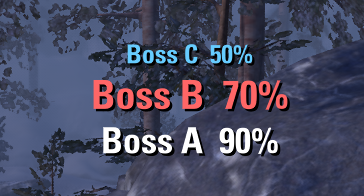
Live tracker frame: An optional movable frame shows each boss’s live HP% and the next armed threshold, one row per boss.
Shipped trial boss data: All 14 trials come pre-listed, so you can set up a boss’s alerts from anywhere no need to stand in front of it.
Share & copy: Export any scope a single boss, a zone, your global defaults, or your whole profile to a text string and send it to your group. Import with a Replace or Merge choice. You can also copy one zone’s thresholds to another in a click.
Good to know
Alerts fire only while you are in combat.
Each threshold fires once per combat; wipe & retry re-arms everything.
Joining a fight late will not replay thresholds the boss already passed.
Shared-health twins announce each threshold only once.
Boss names in shared strings are client-language specific a string made on an English client will not match bosses on a German client, and vice versa.
Slash commands
/thr or /thresholds unlock/lock the tracker frame and alert text to reposition them.
Dependencies
LibAddonMenu-2.0 required for the settings panel. The addon still loads and fires the default alerts without it, but all configuration lives in the panel.
Bug reports and feature suggestions are very welcome in the comments.
Made with good vibes.







