
Vigilant – Group Buff Tracker (1.0.0)
Vigilant – Group Buff Tracker
AI disclosure: Vigilant was developed with the help of an AI coding assistant (Claude Code, by Anthropic). I reviewed and tested the code in game and maintain it myself.
Required library:
LibAddonMenu-2.0 r43 or newer
https://cdn-eso.mmoui.com/preview/pvw18290.jpg
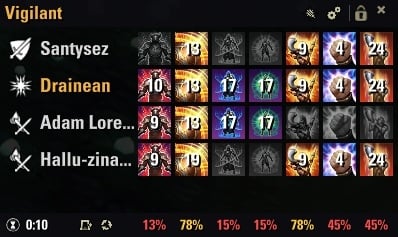
See at a glance which buffs every member of your group has. Pick the buffs you care about from a list of the common group buffs, or any other buff or proc of the game from a searchable catalog, and Vigilant shows who has them, how long they last and their uptime in combat.
Screenshots were taken with the Spanish game client. The add-on is fully translated into English and Spanish and follows your game language.
Features
Grid view one row per member and one column per buff: lit icon with the time left when they have it, grey when they don’t.
Summary view one row per buff with how many members have it (6/8). Hover a row to see who is missing it.
Uptime in combat the footer shows the combat time and, below each buff, the share of it the group had the buff. Hover a percentage to see every member. It only counts while you are in combat.
Per fight or for the whole run count each fight on its own, or add up every fight of a dungeon or trial run (until you change zone). Switch with the button of the footer and reset it with the circular arrow.
44 common group buffs Major/Minor Courage, Force, Slayer, Berserk, Resolve, Powerful Assault, War Horn, Pearlescent Ward and more, by category in the settings.
Catalog of every buff and proc search any effect of the game by name or browse it by category (sets and procs, Major/Minor buffs, classes, weapons…) and track it with one click. Active now lists what you and your group have at that moment, handy to add a proc right after seeing it. No ability IDs needed.
Every variant counts a buff is recognized no matter which skill or set gives it, and its name shows in your game language.
Your own column order move each buff up or down.
Move and resize unlock the window with the padlock, drag it and resize it from its edges or the bottom-right corner; the icons fit the window.
Account or character settings one setup for all your characters, or a different one for this character.
Lightweight effect events are filtered by the game and only listened to while the panel is visible; the panel only redraws what changes.
Languages English and Spanish.
Quick start
The panel appears on the left of the screen, unlocked. Drag it where you want it, resize it, and click the padlock to lock it.
Pick the buffs in Settings → Add-Ons → Vigilant (or the gear icon of the panel).
For any other buff or proc: Other buffs and procs → Open catalog, and click +.
Chat commands
/vigilant show/hide the panel
/vigilant unlock | lock move and resize the panel / fix it in place
/vigilant grid | summary switch view
/vigilant browse catalog of every buff and proc
/vigilant add track a buff by its name
/vigilant remove stop tracking a custom buff
/vigilant list tracked buffs
/vigilant reset reset the uptime
/vigilant settings open the settings
Credits
sirinsidiator LibAddonMenu-2.0 (settings panel).
The ability IDs of the built-in buff list were cross-checked against the data of LUI Extended (LuiData), FancyActionBar+ and LibCombat.
The effect catalog is based on the one in my add-on OmniAura, and the window style on my add-on Nirnhoned Metrics.
The icons are the game’s own art (ZeniMax Online Studios).
Source code and bug reports
github.com/atgrau/eso-vigilant licensed under the GNU GPL v3.0.
If you enjoy it, you can support it on Ko-fi or with gold in-game to @Artioner (EU megaserver).