

Select All Items From Your Bags When Deconstructing (1.3.0)
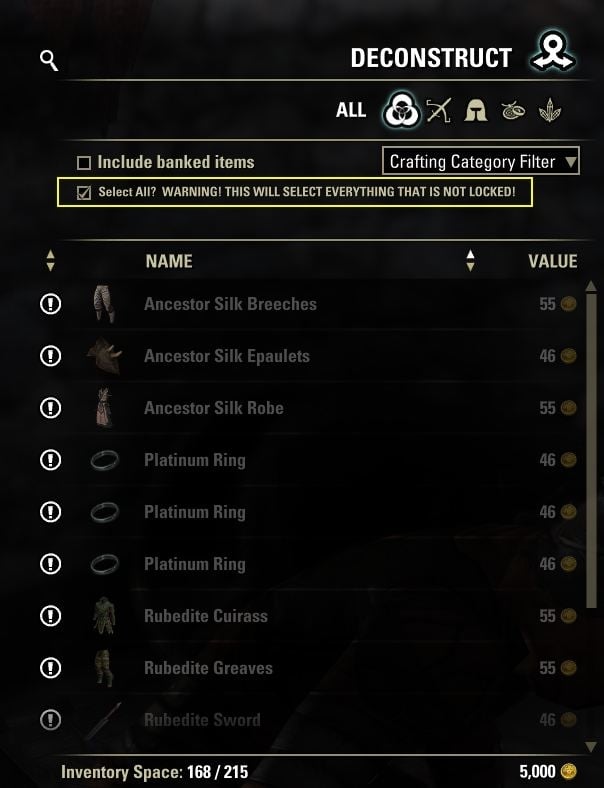
Supports ESO’s keyboard/mouse and controller interfaces at equipment deconstruction stations and universal deconstruction assistants.
Keyboard:
The existing warning checkbox remains above the item list. Tick it to select eligible unlocked backpack items; untick to clear the selection.
Controller:
Open the deconstruction screen, use the on-screen **Options** controller prompt, and highlight **Select All?**. The full warning appears in ESO’s tooltip panel. Toggle the checkbox using the controller, then close Options to apply it. Untick it in Options and close the menu to clear the selection.
Misc Info:
This uses ESO’s native controller checkbox and menu layout, so screen resolution and UI scaling are handled by the game rather than fixed screen coordinates. The controller option is only added to the active equipment or universal deconstruction panel, never other crafting menus. ESO’s current preferred interface determines which control is available. Changing interface mode resets the controller checkbox.
The default is unticked, with no saved preference. Manual selection changes, item-category changes, station changes, and crafting reset it. Selection is limited to eligible backpack items accepted by the station; banked, equipped, and player-locked items are excluded. FCO ItemSaver deconstruction protection is respected when available. Other add-on filters/protections are not integrated. Universal crafting-category restrictions are respected. Unlocked valuable, researchable, set, and Armory items can be selected.
ESO’s selection limits apply. Partial selection is reported in chat and leaves the checkbox unticked. Process the batch and tick again for the remaining items. The add-on only selects items; the player still initiates and confirms deconstruction.







