

Plunder Skull Tracker (1.1.0)
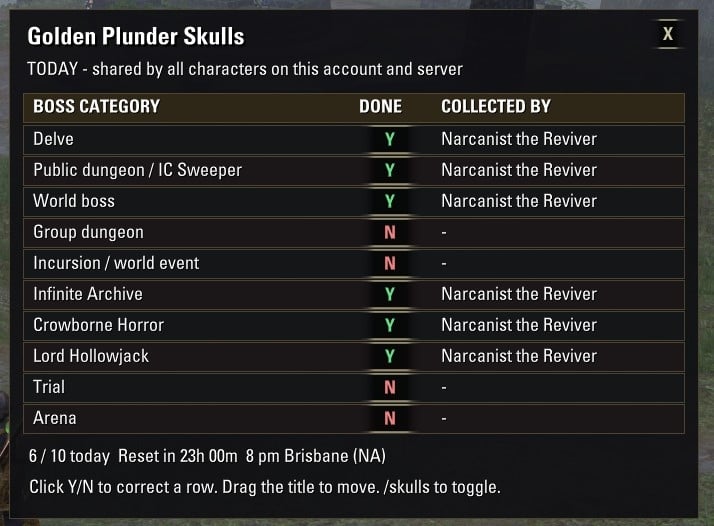
GOLDEN SKULL TRACKER v1.1.0
INSTALL
1. Exit ESO completely. If upgrading, overwrite the existing addon folder.
Keep your SavedVariables file; existing checks and window position survive.
2. Extract the GoldenSkullTracker folder from the ZIP into your AddOns folder:
E:OneDriveDocumentsElder Scrolls OnlineliveAddOns
3. Check that this exact file exists (no extra nested folder):
…AddOnsGoldenSkullTrackerGoldenSkullTracker.txt
4. Launch ESO and enable Golden Skull Tracker in the Add-Ons menu.
If listed as out of date, enable Allow out of date add-ons, where offered.
No dependencies are required.
USE
The checklist appears on first install. Type /skulls (or /goldenskulls)
in chat to show/hide it. X closes the window without stopping tracking.
Drag the title area to move it. Its position and visibility are remembered.
Y = a golden skull has been recorded today on this account/server.
N = no golden skull has been recorded today on this account/server.
Each row also shows the character that first collected the skull.
All characters share the checklist; NA and EU have separate records.
Automatically checks three reward paths: the boss loot window, the loot
notification, and newly added golden Dremora Plunder Skulls in your backpack.
It accepts both plain item names and item links, with broader category-name
matching (including Public Dungeon / Public & Sweeper variants). The two festival quest turn-ins are also detected by
their English quest names, so their reward is recorded even if ESO does not
send a loot event. You do not need to open a skull container for it to count.
Open the boss loot or loot its skull: a generic combat kill alone is not
used as proof of a golden reward, since intermediate dungeon/arena bosses
and repeat kills can otherwise falsely mark a daily category complete.
The boss loot-window check can mark Y as soon as the golden reward is visible,
even before taking it. Be sure to take your reward. If a boss dies without
providing a category-specific golden reward, this checklist does not mark Y.
Regular purple skulls and other players’ loot do not count.
Click a Y/N cell to correct it or add a completion from earlier today.
An asterisk beside the character name means the entry was manually recorded.
Click a Y again to clear that row. The click itself records the current
character; you cannot retroactively infer which earlier character earned it.
DAILY RESET
This is a DAILY reward checklist, not a one-time festival achievement list.
It resets all rows automatically at the server’s daily reset, including
when you next log in after missing several days. The reset uses a fixed regional clock, independent of the login-reward
countdown: NA 10:00 UTC = 8:00 pm Brisbane every day; EU 03:00 UTC.
The display checks the day once per second even while hidden. After a logout,
it checks again on the next login. The reset countdown is in the window.
IMPORTANT LIMITS
English game client required for automatic name/quest detection in v1.0.
N means not recorded, not proof you have never killed that boss.
The addon cannot reconstruct rewards earned before installation, or while
disabled, and intentionally does NOT scan old unopened skulls in your bags:
they might have been earned on another day. Correct those rows manually.
Automatic tracking confirms receipt/quest turn-in, not the boss kill alone.
The checklist can be opened outside the festival; it only updates automatically
when matching rewards/quests are received. Manual corrections remain available.
ESO normally saves addon data on logout or /reloadui. A forced process kill
can lose changes since the last save.
DIAGNOSTICS
/skulls debug prints the version, last skull observed this session and
the detection source for completed rows. If a new gold skull is missed,
copy that output along with the exact skull name.







