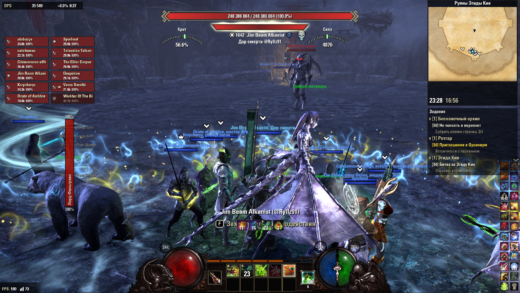
This add-on was developed with AI assistance, including code generation.Аддон разработан с использованием искусственного интеллекта (ИИ), в том числе для написания кода.DIAhelp Diablo-style interface and everyday helpersAuthor: alabuzya | Contact: aabuziarov@gmail.comENGLISHDIAhelp combines a Diablo-style resource display with two skill rows, largerability timers, inventory list/grid switching, a combat meter, compact groupframes, a minimap with clocks, a quest tracker and QuestArrow navigation.It also provides buff displays, chat timestamps and message copying,automatic repair/recharge at 10%, and sale of items already marked as junk.Click the combat meter to switch between detailed and compact modes.Compact mode shows DPS, estimated damage share against the observed target,and combat time. This share is an estimate based on observed health loss,including all attackers; unavailable data appears as –.Right-click a chat timestamp to open Copy message, then use Ctrl+C.No required libraries. Designed for keyboard/mouse UI. No settings menu yet.Disable overlapping add-ons when using the integrated features, particularlyDiabloFrames, GridList, AutoRecharge, JunkHandler, FancyActionBar,Votan’s Minimap, Ravalox Quest Tracker and overlapping Bandits UI modules.Disable pChat and standalone QuestArrow to use the bundled alternatives;otherwise those standalone add-ons take priority.Extract the DIAhelp folder into DocumentsElder Scrolls OnlineliveAddOns.Full instructions and limitations are included in README.txt (English/Russian).РУССКИЙDIAhelp объединяет интерфейс ресурсов в стиле Diablo, две строки умений,крупные таймеры, переключение инвентаря между списком и сеткой, DPS-метр,компактные полосы группы, миникарту с часами, задания и навигацию QuestArrow.Также есть панели эффектов, время и копирование сообщений чата,автоматический ремонт и зарядка при 10% и продажа уже отмеченного мусора.Щелчок по DPS-метру переключает подробный и краткий режимы. Краткий режим:DPS, приблизительная доля урона по наблюдаемой цели, время боя. Доляоценивается по потере здоровья цели от всех атакующих; без данных –.Правая кнопка по времени сообщения открывает копирование текста через Ctrl+C.Обязательных библиотек нет. Рассчитан на клавиатуру и мышь.Отдельного меню настроек пока нет. Отключите аддоны с дублирующими функциями.Чтобы использовать встроенные чат и стрелку, отключите pChat и QuestArrow.Распакуйте папку DIAhelp в DocumentsElder Scrolls OnlineliveAddOns.Подробная инструкция и особенности в двуязычном README.txt.CREDITS / АВТОРСТВОBased on DiabloFrames: BulDeZir (code), Forsion (art/texture work).https://gitlab.com/teso-addons/diablo-framesIndependent fork maintained by alabuzya, developed with AI assistance.Bundled QuestArrow: alabuzya. GPL-3.0-or-later; see LICENSE and CREDITS.txt.Not affiliated with or sponsored by ZeniMax Media Inc.Questions and suggestions / Вопросы и пожелания: aabuziarov@gmail.com