Fill Your Craft Bag during the ESO Plus Free Trial
Get free access to the Craft Bag, DLCs, and more with a new limited-time ESO Plus Trial!


Get free access to the Craft Bag, DLCs, and more with a new limited-time ESO Plus Trial!
In celebration of Bethesda Game Studios’ recent reveal, we invite you to defend Alik’r with a new Golden Pursuits campaign!
Welcome to The Elder Scrolls Online PTS v12.2.1! This week, Undaunted Celebration is being added to PTS for testing.
Skyrim and the Nords take center stage this November in The Elder Scrolls Online!
Preview some of the new and returning items making their way to the Crown Store this November!
Welcome to the best Morgan Blackhand Build for Cyberpunk 2077 (Patch 2.5). Morgan Blackhand is the solo every other solo in Night City talks about, and this is my take on him: Smart guns that never miss, a rocket launcher in my arm, and a Sandevistan that stuns the whole room the moment I activate […]
The post Cyberpunk 2077: Morgan Blackhand Build | Smart Solo (2.5) appeared first on AlcastHQ.
Welcome to the best Contagion Build for Cyberpunk 2077 (Patch 2.5). Contagion infects a whole group with poison, Overheat melts their armor, and the moment fire touches an infected enemy, the poison detonates. I spread it with quickhacks, set it off with the Prototype: Shingen Mark V and the Thermal Monowire, and cut through whatever […]
The post Cyberpunk 2077: Contagion Build | Poison Netrunner (2.5) appeared first on AlcastHQ.
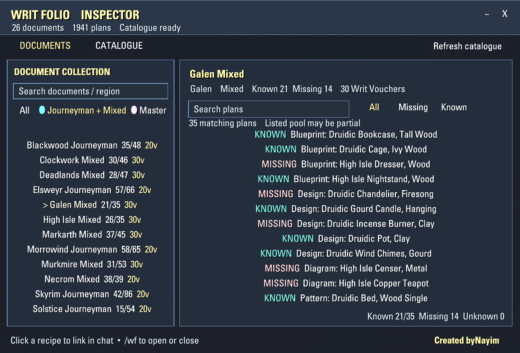
# Writ Folio Inspector**Track your furnishing plans, discover missing recipes, and explore Furnisher’s Documents in The Elder Scrolls Online!**Writ Folio Inspector is a furnishing collection addon designed to help players organize and inspect furnishing plans obtained from Furnisher’s Documents purchased with Writ Vouchers.Whether you’re a dedicated housing enthusiast, a master crafter, or a furnishing plan collector, Writ Folio Inspector makes it easier to identify missing recipes and explore potential document sources.## Features**Furnisher’s Document Inspector**- Browse 26 Furnisher’s Document collections containing over 1,900 plan entries.- View furnishing plans associated with each document.- Check Writ Voucher prices where available.- Browse documents by category and region.- Track learned, missing, and unknown recipe statuses.**Furnishing Catalogue**- Explore furnishing plans indexed through LibFurnitureCatalogue.- Identify plans your character has already learned.- Find missing furnishing recipes.- Quickly search and filter through the collection.**Advanced Search & Filters**- Search for specific furnishing plans.- Filter recipes by All, Missing, or Known.- Search documents by name or region.- Browse Journeyman, Mixed, and Master document categories.**Furnishing Plan Tooltips**- Display potential Furnisher’s Document sources in supported furnishing plan tooltips.- View associated Writ Voucher costs.- Get additional source information when inspecting furnishing plans, including supported Guild Trader tooltips.**Clean & Convenient Interface**- Custom-designed, draggable addon panel.- Minimize the panel into a movable icon.- Click furnishing plans to insert their item links into chat.- Scrollable recipe and document lists.- Keyboard shortcut support.- Lightweight interface with cached recipe knowledge and catalogue information.## Commands`/wf` Open or close Writ Folio Inspector.`/writfolio` and alternative command
Change Log:——————–1.0.0 First public releaseDescription:——————–✦ AI DISCLOSURE & DEVELOPMENT CREDITS ✦AI tools were used in a supporting role during the creation of this addon, both for its visual assets and selected development tasks:Visual assets: AI image-generation tools (ChatGPT by OpenAI) were used to create the addon’s twelve icon designs and their artwork/textures.Development assistance: ChatGPT (OpenAI) was used as a supporting development assistant for technical research, explanations, brainstorming, code suggestions, troubleshooting, code review, and documentation.Localization & Translation: AI tools were also used to translate the addon into other languages. Please note that due to the nature of automated translation, some linguistic inaccuracies or minor typos may occur.AI assistants were supporting tools, not the primary means of development. The addon was primarily designed and implemented by Weyland, who also performed the in-game testing and validation. AI assistance complemented the development process on selected tasks rather than replacing the author’s own programming work.WEYLAND HUNTSMAN’S WARMASK TRACKERA HUNTSMAN’S WARMASK HUD MARK OF HIRCINE LIVE TIMERA compact, customizable HUD tracker for your own Mark of Hircine applied by Huntsman’s Warmask. Keep the mark’s icon and remaining duration visible while you switch targets and fight through groups of enemies no need to keep the affected target selected or reopen the buffs list.The tracker follows the specific mark applied to its target, not whichever enemy happens to be selected. It displays game information only and does not automate gameplay or perform combat actions.WHAT YOU SEE ON SCREENYour…
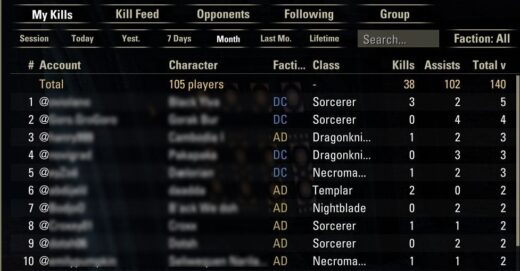
Lethal PVP InsightsTrack kill statistics and top PvP builds, and choose who to share your data withLethal PVP Insights (LPI) is a PvP companion for Cyrodiil, Imperial City and Battlegrounds. It counts your killing blows and assists, displays kill feed leaderboards per faction, and records the skills, procs and sets that friendly and enemy players use. It also keeps a history of players you follow and of your group members, including their full gear and skill bars.Optional: share your collected data with your faction, guild or friends list. Check out esopvp.com for server-wide leaderboards, class statistics and top PvP builds.RequirementsLibAddonMenu-2.0 – optional, for the settings panel (every setting also has a /pvpdi command)LibChatMessage – optionalIn-game Settings > Social > PvP Kill Feed turned on (the kill feed is the main source for kills and assists)Windows OS, for the optional LPI Companion (gear & skill bar import, esopvp.com). Nothing to install: it uses Python 3 if installed, otherwise the PowerShell built into WindowsInstallationUnzip the LethalPVPInsights folder into DocumentsElder Scrolls OnlineliveAddOns (or use Minion).Enable it in the AddOns menu and turn on the PvP kill feed (Settings > Social).Open the window with /pvpdi or a key under Controls > Keybindings > Lethal PVP Insights.Optional: double-click LPI COMPANION.bat in the addon folder once to start the Companion (it adds a shortcut with the LPI icon).FeaturesKills & Kill FeedMy Kills: your killing blows and assists per enemy @account and class, with a total rowKill Feed: a leaderboard of every kill in the kill feed, filterable by faction (AD / EP / DC)Periods: Session, Today, Yesterday, 7 Days, This Month, Last Month, Lifetime (days follow the game’s daily reset)Opponents – what enemies hit you withEvery enemy player who recently attacked you, including faction, class, race, max health and mundusEverything they hit you with, sorted by type: Weapon, Skill, Passive, Ultimate, Synergy, Proc Set, Monster Set, Mythic, Weapon Glyph, Poison, CP, Damage EffectPer-day view, because builds change from one day to the nextGroup history & full buildsThe last 200 accounts you grouped with (PvP, PvE or both): class, race, CP, role, faction, health, mundus, buffsFull gear and both skill bars for group members, imported from the game’s encounter log – the addon turns the log on only while needed and off again as soon as everyone is capturedMultiple setups per player (“Build 1/N”)FollowingPress Follow on any friendly player or opponent to keep a daily snapshot of their build until you unfollow themFollowed players never expire and don’t count toward the stored data limitsShare builds in chatSelect a player and press Link: a link goes into chatAnyone with LPI can click it to see that build (class, race, CP, mundus, skill bars, gear)Account name changesWhen a character shows up under a new @account, the details show the player’s former name (“formerly @OldName”)Real Death Recap (off by default, PvP areas only)Pops up when you die: the top 5 damage sources of the fightThe last 10 hits before death with timingLPI Companion (optional, Windows)Imports gear and skill bars from Encounter.log – automatically or with one click on Upload in gameTurns the encounter log on only briefly to capture the data it needs, and deletes the log after each importOptional upload to esopvp.com (see below) and download of data shared by other players (displayed in the addon with a blue +)esopvp.com (optional)Nothing leaves your PC unless you tick Upload my LPI data to esopvp.com in the Companion. When you do, you get:Server-wide leaderboards, alliance and class statistics, and curated Top BuildsYour own data in the browser (register with the Identifier shown in the Companion)Builds other players saw of your opponents and group members, merged into your addonYou decide who can see your group builds, followed players and friendly players (All, Your Faction, Guild Members, Friends or None) in Settings > Data sharing. You can stop uploading or delete your uploaded data at any timeSlash commands/pvpdi – open / close the window/pvpdi settings – settings panel/pvpdi status – what is being recorded right now/pvpdi recap – show the last Real Death Recap/pvpdi link – put the selected build into chat/pvpdi pvponly on|off – track only in PvP areas/pvpdi notify on|off – chat message on kills and assists/pvpdi groupscope pvp|pve|both – where group history is recorded/pvpdi capture – turn the encounter log on manually/pvpdi autolog auto|ask|never – automatic encounter log while grouped/pvpdi import, /pvpdi deletelog, /pvpdi logpath – encounter log tools/pvpdi killdays <1-60>, /pvpdi buffhours <1-168> – how long data is kept/pvpdi skillreset – undo your right-click type choices/pvpdi reset (session), /pvpdi cleargroup confirm, /pvpdi wipe confirm – clear dataFAQWhy are my kills counted as assists?Turn on the PvP kill feed (Settings > Social). Only kills the kill feed credits to you count as killing blows.Why don’t I see a group member’s gear?Addons can’t read other players’ gear directly; the game only writes it to the encounter log. Start the Companion, fight once while grouped, then click Upload in the import window and /reloadui.Why do some skills have a * next to them?They were seen as a buff on that player and may have come from another player (group heals, banners, Contingency…). Skills on the captured skill bars never have a *.Does it work in PvE?Kills, opponents and the Death Recap are PvP only. Group history can be recorded in PvE too (Settings > Group history).This Add-on is not created by, affiliated with or sponsored by ZeniMax Media Inc. or its affiliates. The Elder Scrolls and related logos are registered trademarks or trademarks of ZeniMax Media Inc. in the United States and/or other countries. All rights reserved.