Star Wars Zero Company Best Weapons Ranked
In this guide we review every weapon in Star Wars Zero Company ranked by AP efficiency, critical value, and class fit, with a full breakdown of how each one plays.


In this guide we review every weapon in Star Wars Zero Company ranked by AP efficiency, critical value, and class fit, with a full breakdown of how each one plays.
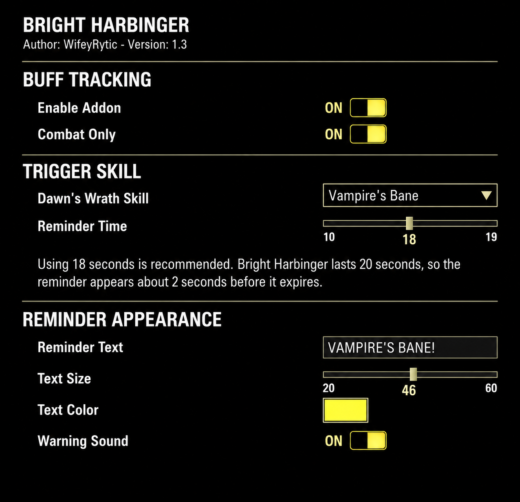
Bright Harbinger is a simple Templar reminder for the Bright Harbinger Class Mastery effect.Choose the Dawn’s Wrath skill you use, and the addon reminds you whenit’s time to cast it again so Bright Harbinger doesn’t fall off.Features: Choose your Dawn’s Wrath skill Adjustable 1019 second reminder Custom text, size, and color Optional warning sound Move the reminder anywhere on screen Combat Only optionRequires LibAddonMenu-2.0
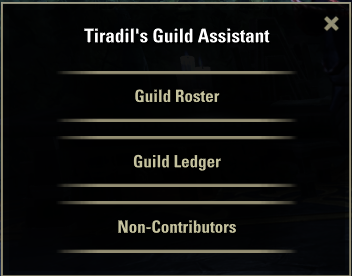
Tiradil’s Guild Assistant (TGA)Tiradil’s Guild Assistant (TGA) is an integrated four-module toolkit built for officers and guild masters managing multiple guilds (up to 5) at once. Powered by LibHistoire, it listens to your guild’s complete history donations, sales, purchases, trader auctions, and member activity and turns it into clear, actionable reports.Note: All character names shown in the screenshots have been replaced with “Member” designations, and transaction amounts (sales and donations) have been randomized for privacy and demonstration purposes. Guild Ledger Accounting SystemStore sales volume, guild tax revenue, member deposits, withdrawals, and trader rent all in one view, with a running net profit/loss calculationFlexible period filtering: this week, last week, last month, all time, and moreMember Lookup: search any member’s full history with its own guild and period selector Automatic Rank SystemLegend / Diamond / Gold / Silver / Bronze ranks (fully renameable to match your own guild’s naming) assigned automatically based on sales and donation thresholdsTop N mode: instead of a fixed threshold, make the top N sellers and top N donors of the period earn the top rank counts are fully configurableIndependent settings per guild Trader Kiosk TrackingFull history of which guild won or rented which trader, when, and for how muchCurrent holder clearly marked at a glanceAutomatic winner/loser detection tied to the weekly reset cycle Non-Contributing Member TrackingAutomatically flags members with no contribution for a configurable period (14/30/60 days)Separate Watch List and Kick List tabsKick members directly from the list permission- and rank-checked, with a confirmation prompt Native Guild Roster IntegrationAdds “Contribution” and “Rank” columns directly to the game’s own Guild RosterHover a member’s name for an instant summary: membership length, last activity, total donations and salesRight-click menu adds: search in Ledger, mark for kick review, send mail, and edit personal notePersonal Notes: private, client-side-only notes that never leave your machine leave a note on a member from the Guild Roster and see it automatically in the Ledger and in Non-Contributing Members Also IncludedEvery window is freely resizable by dragging its edgesFull English, Turkish, German, Spanish, Polish localizationSupports up to 5 guilds, each with independent settingsRequires: LibHistoire, LibAddonMenu-2.0, LibGuildRoster, LibCustomMenuNote: All character names and figures shown in the screenshots have been randomized/anonymized for privacy and demonstration purposes.
Welcome to our Duelo Build Guide for Soulframe. Duelo is one of the Pacts (classes) available in Soulframe. It focuses mainly on single-target melee damage and agility, rewarding players for perfectly timing their blocks and dodges. This Duelo Build is up to date with Soulframe Preludes 15. We will continue to update it as Soulframe […]
The post Soulframe Best Duelo Build appeared first on AlcastHQ.
Here is everything you need to know about the upcoming Warden Class Refresh coming in 2027 to The Elder Scrolls Online.
LibInteriorDetectionby @Kreksar5 and Claude.aiAI-ASSISTED ADDON. Written with Claude.ai. Reviewed and tested in-game by the author see the Design Notes section below for what has and hasn’t been specifically verified.A library for The Elder Scrolls Online that reports whether the player is currently indoors, combining a per-zone “interior” default with live door-transition and map-teleport toggles for the cases that produce no zone change and no reliable event at all, plus an optional on-screen HUD.For the full version history, see the Change Log tab, or CHANGELOG.md included in the download.OverviewThe ESO addon API has no function that reports whether a zone is indoors or outdoors, and no function that exposes world geometry, collision, or occlusion data of any kind see Design Notes below for what was actually investigated and ruled out before landing on this approach. LibInteriorDetection works around that gap with three layers:A static per-zone default (interior/exterior), looked up whenever the player enters a new zone.A live door-transition toggle that flips the flag when the player crosses through an ordinary building doorway that produces no zone change and no reliable event at all the case the static table alone cannot see.A map-teleport check that resets the flag to the zone default when the player fast-travels via the world map to a different part of the SAME zone a case that fires neither a zone-change event nor a door interaction.Client Language SupportZone lookups are keyed entirely by real, language-independent zoneId never by zone name, and never resolved from one at runtime. The only zone name shown to the player is display text (the /amioutside diagnostic line), sourced directly from ESO’s own native GetZoneNameById(zoneId).The HUD text itself is not localized. Unlike LibZoneTemp’s fully language-independent design, the on-screen “INDOORS” / “OUTDOORS” labels and all slash command chat output in this library are hardcoded English strings. This is a real gap, not an oversight being hidden flagged here so it isn’t mistaken for the same client-language coverage LibZoneTemp provides.FeaturesPer-zone interior/exterior defaults for all 1,053 zoneIds LibZoneTemp v2.3.15 tracks overland zones, delves, dungeons, trials, and player housesLive door-transition toggle for ordinary building interiors with no zone/map change, ported from the DoorDeltaTest diagnostic addonMap-teleport check that resets to the zone default when the player fast-travels to a different part of the same zone covering wayshrine travel, player-house map travel, and a general world-map-open/close fallback for cases where the specific triggering function isn’t knownLogout/login persistence a player who logs out inside an interior pocket of an exterior-default zone and logs back into the same spot stays flagged interiorSettings panel configurable door-check delay, door-transition distance threshold, per-zone interior/exterior overridesDebug-only on-screen HUD showing live INDOORS/OUTDOORS status, off by defaultSlash commands /amioutside, /lid debug hud on|offDependenciesPlease install the newest available version of each:LibZone reports the player’s current zoneId/parentZoneIdLibAddonMenu-2.0 settings panel UIBoth are hard dependencies ESO will refuse to load LibInteriorDetection at all if either is missing. LibAddonMenu-2.0 is a new requirement as of v0.5.0.InstallationDownload and unzip LibInteriorDetection into your addons folder:liveAddOnsLibInteriorDetectionThe folder should contain:LibInteriorDetection/├── LibInteriorDetection.lua├── LibInteriorDetection.txt├── CHANGELOG.md└── README.mdEnsure LibZone is also installed always use the newest available version.Launch ESO. LibInteriorDetection will initialise automatically on the EVENT_ADD_ON_LOADED event.Public API– Returns the player’s current LIVE indoor state (combines zone default +– door toggle). Returns nil if state hasn’t been established yet (before– the first EVENT_PLAYER_ACTIVATED).local isInterior = LibInteriorDetection.IsPlayerIndoors()– Returns the CURRENT ZONE’S static default only, ignoring the live– toggle. Useful for diagnosing when the two have diverged.local isInterior, zoneId, isKnown = LibInteriorDetection.GetCurrentZoneInterior()– Returns the static default for an arbitrary zoneId.local isInterior, isKnown = LibInteriorDetection.IsZoneInterior(zoneId)Slash Commands/amioutside prints the live state as true/false, plus a diagnostic line with zone name, zoneId, the zone’s static default, the current door-delta threshold, and the current door-check delay/lid debug hud on|off shows/hides the on-screen debug HUD. Off by default; state persists across relogs (account-wide) but is deliberately not exposed in the settings menuSettings PanelAccess via /lidsettings or Settings → Addons → LibInteriorDetection Settings:Door Check Delay (seconds) slider, 3-13, default 3. How long after an interaction the door-toggle mechanism waits before comparing positions. Raised from an original 1-5/default-1 range after the author found delays below ~3s stopped detection working entirely on their system.Door Transition Distance Threshold slider, 1000-8000 raw world units (10m-80m), default 2000 (20m). How far the player’s raw position must move after an interaction to count as a door transition.Zone to Override / Override pick any zone from the library’s own 1,053-entry table and force it to Interior, Exterior, or back to the library default. A live list shows every override currently set, and a “Clear All Overrides” button resets them all.How the Door Toggle WorksOn EVENT_PLAYER_ACTIVATED (a real zone change): liveFlag = zone’s static default — always wins, resets mid-toggle stateIf zone default is INTERIOR: liveFlag stays true — door interactions tracked but never flip itIf zone default is EXTERIOR: liveFlag starts false each detected door transition flips it — interaction, then a — configurable delay later a — same-zone raw-position delta — over thresholdKnown limitation: this assumes symmetric in/out door pairs. A player going tavern → basement → tavern → street (three real door crossings from one exterior-default zone) desyncs the flag, since nested interiors aren’t tracked as a stack in this version.Zone Data Coverage & ConfidenceThe 1,053 zoneId entries were classified in four tiers of decreasing/increasing confidence, recorded per-line in the source as a trailing comment:90 zones known-zone / known-name: author’s direct game knowledge (overland zones, well-known named dungeons/delves)499 zones notes:interior / notes:exterior: derived from real UESP-verified descriptive text (see Design Notes)98 zones keyword: the bare zone name contains a clear structural word (cave, crypt, sewer, island, valley, etc.) with no descriptive note available366 zones verified: individually researched and confirmed by the author, either via web research or direct game knowledge the highest-confidence tier alongside tier 1Final split: 671 interior / 382 exterior.Note on “tested in-game”: the detection mechanism itself (zone-change handling, the door toggle, the map-teleport check, and logout/reload persistence) has been directly tested and confirmed working in-game across all of its documented cases. The 1,053 zone classifications above have NOT been individually walked in-game one by one tiers 1-3 remain lore/naming-derived judgment calls, and tier 4 was verified via web research or direct game knowledge rather than an in-game visit to each zone. Treat a specific zone’s classification as correctable, not as verified fact, and use the settings-menu override if one is wrong for you.Design NotesWhy is there no live “is indoors” signal at all? Extensively investigated and ruled out before building this library: ESO exposes no raycasting, collision, or terrain-height query to addons; no multi-floor map layer system (unlike some other MMOs); no ambient-audio query API; and `GetMapContentType()`/`GetCurrentZoneHouseId()` only cover dungeons and player houses specifically, not ordinary buildings. The three-layer design here (static zone table, live door toggle, map-teleport check) is the result of working through each of those dead ends in turn.Why is the zone table a judgment call and not verified data? There is no ESO API for this at all, so same as LibZoneTemp’s static weather-probability table this is authored, not read from a game source. Where LibZoneTemp’s temperature values are lore-derived climate estimates, this library’s interior/exterior flags are lore-derived enclosure judgments. Every zoneId itself, however, IS real and verified: pulled directly from LibZoneTemp v2.3.15’s own audited tables.Known recurring failure mode, found and fixed once already: the notes-based tier (499 zones) can misfire when a descriptive note’s first sentence describes the location’s setting rather than its own structure e.g. “A player house in Daggerfall, near the docks” triggered “docks” as an exterior signal for what is, architecturally, an indoor house. Found and corrected 14 such cases across every “player house/home” entry as of this version. The same failure mode may exist uncaught in other structure categories (chapels, garrets, studies, etc.) that weren’t specifically audited flagged here rather than assumed fixed everywhere.Known residual gap: zones in the “Black Marsh” province can trigger a “marsh” exterior-keyword false positive from the province name itself rather than the location’s own terrain. Checked all 21 affected zones by hand none actually changed classification because of it in the current table, but this has not been proven safe in general.Why does the door toggle only fire on interaction, not continuously? Hooking `INTERACTIVE_WHEEL_MANAGER.StartInteraction` catches the moment a player opens a door; polling position continuously would be far more expensive for no real benefit, since a position jump without an interaction immediately beforehand isn’t a door crossing.Why doesn’t the door toggle also catch a same-zone map teleport? It’s gated on an interaction, and a remote map click isn’t one. Testing confirmed this case doesn’t fire `EVENT_PLAYER_ACTIVATED` either, unlike a cross-zone teleport or entering a full-zone-change location. Three complementary trigger sources feed a single check: `FastTravelToNode(…)` for wayshrine-style map travel (sourced from a decade-old ESOUI forum thread, confirmed correct in-game), `RequestJumpToHouse`/`JumpToHouse`/`JumpToSpecificHouse` for player-house travel (confirmed real via UESP’s own API export data), and a world-map-open/close watcher as a more general fallback for cases where the specific internal function isn’t known or hookable (e.g. a house’s exterior-door sub-option, which fires none of the other three). All feed the same reset-to-zone-default check rather than toggling, since a teleport (unlike a door) isn’t symmetric and can land the player anywhere regardless of their prior state.Why does the check poll for up to 15 seconds instead of a fixed delay? Testing revealed ESO’s “Recall” ability (used for any world-map-initiated travel, to either a wayshrine or a house) is an 8-second cast, not instant but standing physically at a wayshrine and picking another one skips that cast entirely. The four hooked functions and the world-map watcher all fire at actual-teleport-execution time regardless of which case applies, so a fixed delay tuned for the instant case would be too early for the cast-gated one. A bounded poll (once per second, stopping as soon as a real position change appears or the window expires) is robust to not knowing which case applies in advance, without needing a third delay-tuning guess after the first two (1-5s, then 3-13s) both proved wrong for at least one real scenario.Why is the logout/login persistence character-specific, not account-wide? A saved position only means something for the character that was actually standing there. Account-wide storage (as LibZoneTemp uses for its temperature overrides, a genuine cross-character preference) would let one character’s last position leak into a different character’s login, producing a wrong restore rather than no restore at all.How is per-character persistence actually implemented? Via the same `ZO_SavedVars:NewAccountWide` call already used for the account-wide settings table, but with an explicit namespace string combining `GetWorldName()` (server) and `GetCurrentCharacterId()` (character) `”_”`. An earlier version (0.5.00.6.0) used `ZO_SavedVars:NewCharacterIdSettings` instead, passed `GetWorldName()` as its namespace by analogy with the account-wide call; that function’s exact parameter semantics were never independently confirmed, and it’s the likely reason per-character persistence was reported not working plausibly leaving data scoped by server only, shared across every character on it. The current construction avoids relying on that function’s assumed behavior, using only individually well-established primitives instead.Why 50 raw units (0.5m) as a position-match tolerance again, after saying it didn’t work? Position-matching across a genuine relogin was abandoned in 0.6.7 for the reason still true today ESO does not reliably restore exact raw coordinates across a real login, confirmed in testing (positions differed by tens of meters despite no movement). But 0.6.7’s `initial`-only design turned out not to cover `/reloadui`: testing confirmed `initial` reads **false** for a reload, not true. A reload is the opposite case from a login, though the player never leaves the 3D world, so position genuinely should be exact or near-exact if unmoved. 0.6.9 combines both signals: restore if the saved zoneId matches AND EITHER `initial` is true (trust the saved flag, ignore position a real login) OR the position is within this tolerance (a reload that provably didn’t move). A same-zone teleport fails both simultaneously not a login, and genuinely far from the saved spot so it still correctly resets to the zone default instead of carrying over a stale flag.For Addon Authors– Minimal usage: check if the player is currently indoorsif LibInteriorDetection.IsPlayerIndoors() then — apply indoor-only gameplay logicendDisclaimerThis Add-on is not created by, affiliated with, or sponsored by ZeniMax Media Inc. or its affiliates. The Elder Scrolls and related logos are registered trademarks or trademarks of ZeniMax Media Inc. in the United States and/or other countries. All rights reserved.
Living the pirate’s life in Starfield brings with it the thrill of high-stakes encounters and plundering ships, but which build is best? This guide is your compass through the cosmos, revealing the intricacies of the Space Pirate Build – a path paved with ruthless spacefaring tactics and bountiful rewards.
Learn to master the simplest and most effective build in BG3: the Eldritch Blast Warlock specializing in the cantrip that makes the game easy mode.
We rank the best Warlock builds for every playstyle in Baldur’s Gate 3 for 2026, including melee, spellcasting, crowd control, and the ranged Eldritch Blast spammer, all built around what each subclass does best and updated for Patch 8.
Discover the ultimate Warlock melee critical damage dealer – the Great Old One build that focuses on max burst in melee range with additional spellcasting potential.